Tech Support EX

  • Subscribe to our RSS feed.
  • Twitter
  • StumbleUpon
  • Reddit
  • Facebook
  • Digg
Showing posts with label customer love. Show all posts

Thursday, 19 December 2013

Google+ Helps Premier Foods Elves Get Ready for the Holidays

Posted on 09:04 by Unknown
Posted by Holly Drury, Field Sales Manager, Premier Foods

Editor's note: Today’s guest blogger is Holly Drury, Field Sales Manager for Premier Foods, one of the UK’s largest food producers. Premier Foods include iconic brands such as Ambrosia, Batchelors, Mr. Kipling, OXO, Hovis and more. See what other organizations that have gone Google have to say.

Premier Elves is our annual holiday season initiative to help maximise retail sales. In partnership with the major retailers across the UK, Premier Foods is sending out hundreds of elves across various functions from Head Office and multiple sites. Their job is to increase awareness and placement of Premier Foods products in retail stores during the busy Christmas period, drive year-end performance during the holiday shopping season, and share feedback and recommendations with internal teams at this key time of year. All in all, the elves will visit more than 1,000 stores nationwide.

This is the third year Premier Foods has run this successful initiative, but like every successful repeat initiative we always look to make improvements. This year we decided to improve the collaboration and efficiency of Premier Elves and reduce costs and complexity by using Google+.

With the help of Claire Hunt from our internal Google team and our Google partner Appsbroker, the Elves are using the dedicated Premier Foods internal and partner Google+ channels to capture photos of in-store promotional displays, share success stories with other Premier Elves, and collaborate on best practices. With Google+ we are increasing the elves’ efficiency, whilst also improving the customer experience and driving increases in sales.

Being able to capture pictures and context right at the point of sale and share insight across the business and is helping make this year’s holiday season the most successful and fun ever. Thank you to Google+ for making it all work so seamlessly and more importantly, thank you to all the Premier Elves for helping make the holiday season such a success for us here in the UK.

Read More
Posted in customer love, google+ | No comments

Tuesday, 17 December 2013

Kurdistan Regional Government is first government in Middle East to adopt Google Apps

Posted on 08:14 by Unknown
Posted by Hiwa Afandi, Head of the Department of Information Technology, Kurdistan Regional Government

Editor's note: Today, we hear from Hiwa Afandi, Head of the Department of Information Technology for the Kurdistan Regional Government, the official ruling body of Iraqi Kurdistan in Northern Iraq. See what other organizations that have gone Google have to say.

Why did the Kurdistan Regional Government decide to move to Google Apps?
We want to improve our operational efficiency and modernize our technology. We also want to help our 300,000 employees across the Kurdistan Regional Government’s ministries and departments to collaborate and communicate more easily. Like many emerging markets in the Middle East, lack of proper infrastructure and Internet service providers in our region make it very difficult to achieve true “interconnectedness.” That’s why we see Google Apps for Business, and cloud computing in general, as the kind of innovative technology that can help us to achieve our objectives.

What factors did you consider before making the move to Google?
Pricing was definitely a consideration. We are working on several large IT projects that are resource-intensive, including a state-of-the-art data center and government cloud. We like that Google is very price-competitive. But many other benefits – such as ease of use and management, speed, and reliability – were important factors in our decision, as well. We also have full trust in Google’s data security and privacy safeguards.

How many people in the Kurdistan Regional Government are using Google Apps?
About 3,000 employees are currently using Google Apps, including my IT team of 180. Several of the early adopters will be taking the lead in a “train the trainee” program in 2014. One person in each ministry or department will become the Google administrator for that unit and will train other users on how to use Google Apps.

Is there a Google partner assisting with your move to Google Apps?
Our Google partner is BRAMS, based in Dubai. They are helping us to transition both quickly and smoothly to Google Apps from our legacy systems, such as Microsoft Exchange.

How do you see employees using Google Apps after the rollout?
Steve Jobs once said that people don’t know what they want until you show it to them. In a developing country like ours, people sometimes need time to accept and adjust to innovation. I think that once our employees see how easily they can communicate and collaborate with each other – and all from a single platform – they will want to use Google Apps more and more. They will be able to work more efficiently.

What about your IT team? Will the move to Google Apps help make them more productive?
The move to Google Apps has already made our team more productive. I introduced Google Apps to my team as soon as I joined the IT department. It didn’t take long for them to embrace tools like Google Calendar, Google Chat and Google Docs for everyday work. On a broader scale, by moving the entire Kurdistan Regional Government to Google Apps for Business, my IT team doesn’t have to worry about the technicalities of hosting and configuring a complex data center for email and collaboration solutions. That prevents a huge headache. I only have about five people devoted to Google tasks for the entire government. The rest of my team is free to focus on other responsibilities.

I want to emphasize how important that is, especially as the Kurdistan Regional Government pursues a number of other important IT initiatives. In the Middle East, skilled IT resources are difficult to find and retain, and are often expensive to hire. So, we must use our IT resources wisely. Again, that’s why Google Apps and other cloud solutions are so beneficial to us. We don’t have to worry about heavy data storage or processing infrastructure. There is no need to install hardware, implement software or perform complex integrations. We can just focus on our business and on innovation. That is a huge enabling factor for our government.
Read More
Posted in #gone google, customer love | No comments

Friday, 13 December 2013

Google Chromebooks provide personalization, collaboration for mSchool

Posted on 10:41 by Unknown
Posted by Elliot Sanchez, Founder and Chief Executive Officer, mSchool

Editor's note: Today’s guest blogger is Elliot Sanchez, founder and chief executive officer of mSchool, a benefit corporation (B Corp.) that helps community centers and schools in the United States open “microschools” to connect children with structured online learning opportunities. See what other organizations that have gone Google have to say.

At mSchool, we want to see every student receive an incredible, personalized education and make it easy for schools to provide that type of learning experience. We also believe in the thoughtful integration of technology into education.

There are many powerful, fantastic tools available today to help students learn, but using them in the right way to get the right results can be a complicated, and often costly, process. We work directly with local community centers and schools to open – in two weeks’ time and for about $5,000 – accredited one-classroom “microschools” staffed with academic coaches from the local area. Through our adaptive learning program, mSchool gathers over 250,000 data points on student learning in each classroom. That data allows us to individualize our curricula to a student's needs and adjust based on each student's performance.

We offer a technology-rich education option for students, grades 3 through 12, to deepen their math understanding and prepare for Algebra I. This includes multimedia content, interactive animations, tools for creating digital graphs and charts, and formative assessments. Chromebooks are now a big part of that experience. In our pilot classrooms, students used a range of devices – mostly donated equipment – including laptops, PCs, Macs, and tablet computers. But when we were ready to expand our program this year from 30 students to more than 200, we needed to find technology that could grow with us. We considered several different options, but Chromebooks really stood out.
First, we liked the web-based management console for managing Chromebooks and user access. We needed the ability to manage the student experience in a quickly growing number of classrooms across the country-- from around the corner in New Orleans to rural South Dakota. We can remotely control which sites students can access which allows us to help them stay on track with their learning. With Chromebooks, students are spending more “time on task.”

Cost was another primary factor in our decision to use Chromebooks throughout our classrooms. We were able to put a Chromebook into the hands of every student we’re working with this year. The low cost of replacement of the Chromebooks also means we can leave them with the community centers at the end of the academic year.

We never want technology to be a barrier to learning. And with Chromebooks, it isn’t. Students are able to access our cloud based adaptive curriculum and work at their own pace. Chromebooks are allowing our students to engage in ways they weren’t able to with pen and paper and static content like printed books. They also help us to instruct students in a personalized way. And they enable collaboration: students can work through problems independently, but when they get stuck, remote teachers can see exactly what they’re working on and help to guide them.

In 2014, mSchool will expand into five states using grant funding we received this year as part of the Teach for America Social Innovation award. And it’s the reliable rollout and scalability of Chromebooks that will help to ensure we can open all the classrooms that we’ve planned.
Read More
Posted in chromebooks, Chromebooks for Education, customer love | No comments

Monday, 9 December 2013

Graduation Alliance deploys Chromebooks to help at-risk students earn diplomas

Posted on 07:45 by Unknown
Posted by Gregg Rosann, President, Co-Founder and Chief Technology Officer, Graduation Alliance

Editor's note: Today’s guest blogger is Gregg Rosann, President, Co-Founder, and Chief Technology Officer of Graduation Alliance, based in Salt Lake City. Graduation Alliance works with school districts around the country to help students facing challenging life circumstances to graduate. See what other organizations that have gone Google have to say.

High school can be a tough time for any student. But the students we work with face challenges that many of their peers couldn’t even imagine. They may work to support family members who are ill or unemployed, be homeless or have been bullied in school. Or they may have young children. Many of our students haven’t been in a classroom in years.

Since 2007, we’ve been giving students like this the flexibility, academic interventions and social support they need to get back on track and moving forward toward graduation. Working in partnership with local public school districts, we provide a complete suite of online learning courses that are free to students and allow them to earn credits toward graduation at their own pace. We also offer several layers of human support, which is essential to helping students make education a priority.

Because few of these students are in a position to attend a brick-and-mortar school, we provide laptops and internet access to our students as part of the program. We deployed Chromebooks to about 600 students this school year. We determined that moving to Chromebooks from the PCs and tablets we were providing could help us reduce our cost of ownership by significantly reducing the need for technical support. We also like that Chromebooks are essentially “log on and go.” Students don’t have to worry about a multistep process just to get on the web. Also, the speed and simplicity of the Chrome browser helps our students access our online learning program and get to work faster, so they can be more productive.
We manage students’ Internet access through a proxy server that we control though the Chromebook management console. The ability to limit Internet access (which we do when students fall behind in their coursework), turn off machines, and control policies from a central console is very helpful. It allows us to make sure students are taking full advantage of the program. Also, there’s no need to send a Chromebook back to the home office to be reset before it’s issued to another student, as user information is siloed, encrypted and easily wiped remotely. That’s a huge plus for an organization like ours with a nationally distributed student base.

The most important thing about Chromebooks is that they just make sense for our students, because they’ve grown up with the web. Asking them to use a desktop app to access their coursework is a foreign concept. But, if you give them instructions to go straight to a website, they understand. That’s their mindset.

Chromebooks help us focus on our students, and allow our students to focus on moving forward toward graduation. And when a student who once saw nothing but obstacles instead sees their name on a diploma, it’s an amazing thing.
Read More
Posted in #gonegoogle, chromebooks, customer love | No comments

Friday, 6 December 2013

WaterTrax gives utilities a visual view of water quality with Google Maps

Posted on 11:00 by Unknown
Posted by James Griffiths, General Manager of WaterTrax

Editor's note: Our guest blogger is James Griffiths, General Manager of WaterTrax, a Vancouver-based software provider that helps agencies and utilities companies manage operational data for their water and wastewater systems. View our webinar series to learn more about Google solutions for the utilities industry.

To provide clean water to millions of people every day, utilities must analyze petabytes of data to spot and correct potentially dangerous incidents in water treatment and distribution networks. As a provider of operations management software, WaterTrax is always looking for ways to make data monitoring and management easier and more effective for our utility customers.
Mapping of Sampling Points
We integrated Google Maps into our platform to allow WaterTrax users to quickly visualize system data on a map. We created a Google Maps-based tool that provides a spatial display of water system structures combined with real-time water quality data. Quite literally, our product allows utility managers to see how water quality is being affected as water flows throughout the entire system.

By displaying complex data in a visually appealing way, Google Maps helps our customers spot issues and identify trends instantaneously. Utility managers get a visual view of recent test results, compliance history, alerts, complaints and sampling schedules — all mapped to specific locations. Instead of poring over spreadsheets and structured tables to spot trends in sampling data, now they see this data right on a map. We’ve observed that customers like plotting sampling locations on maps using street view, satellite view and terrain view. They also appreciate being able to quickly export map data into their Geographic Information System (GIS) databases.
Mapping of most recent free chlorine results in the distribution system
Going forward, we’ll continue to add enhancements to our Google Maps offering. Already, we’ve added features based on customer feedback. California-based Golden State Water Company wanted to see a glimpse of their chlorine results to know if sampling was up to date and contaminant levels were within acceptable ranges. So we created a search feature in Google Maps to display only the most recent test results. During a recent high chlorate incident, Golden State Water used the WaterTrax mapping interface to track real-time data across their system. The searchable map showed the most recent lab results, so the team could visualize in real-time where chlorate levels were increasing or decreasing to take immediate action.

At WaterTrax, our goal is to make real-time data monitoring easier for utilities. Google Maps allow our customers to spot potential problems quickly, so they can ensure public water safety and quality for millions of consumers every day.
Mapping of most recent free chlorine results in the distribution system
Read More
Posted in #gonegoogle, customer love, Google Maps for Business, utilities | No comments

Google Apps helps eco-cosmetics company LUSH keep the world beautiful

Posted on 07:22 by Unknown
Posted by Cee Chan, IT Manager, LUSH

Editor's note: Today we hear from Cee Chan, IT Manager at the environmentally conscious handmade cosmetics company LUSH. Headquartered in England, LUSH has multiple manufacturing sites and several head office locations in Poole and London. See what other organizations that have gone Google have to say.

At LUSH, we believe in making products that are quality from start to finish and take care to only buy ingredients that have a positive impact on the community from which they are sourced. We send our Ethical Buying Team to visit suppliers, trace the ingredients and meet the growers to ensure care for the environment and fair worker conditions. We take pride in what we do and make an effort to provide our team with the tools they need to create the best products and deliver exceptional service. Yet, as we started to grow, our Scalix email system began crashing regularly, causing our productivity to plummet.
We started looking for a new email solution with three key things in mind. First, we wanted a cloud-based solution that could scale as we grew without causing any service outages. Second, we wanted a solution that would enable seamless, real-time collaboration. We’re a team-oriented company and wanted to employ tools like Google Docs and Hangouts that made collaboration simple, whether it was between two employees in our Poole office or five teams spread across the globe. Third, we wanted a flexible solution that would support our BYOD policy and allow employees to work on any device, from anywhere, at any time. We considered a few different options, but when Ancoris introduced us to Google Apps we found that it was the only solution that fulfilled all of our needs.

Google’s cloud-based solution helps us scale seamlessly without any interruptions to our coverage. Before moving onto Google Apps, we spent at least eight hours a week dealing with IT issues. Now, we can lean on Google to deal with the technology side of our business and we no longer have to worry about things like disk space or email outages—everything just works. The switch to Google Apps is a huge boost to productivity and time savings, which in turn saves us a lot of money. As an environmentally conscious company, it also feels good knowing we are decreasing our footprint by getting rid of our on-site infrastructure and becoming more energy efficient.

Through tools like Docs and Hangouts, Google Apps enables a collaborative and flexible work environment that keeps us all on the same page, no matter where we are located. For example, we use Docs across the company to manage employee schedules and timesheets so that everyone can be on the same page. The fact that any employee can open the shared document and know they’re viewing the most up-to-date version, instead of having to sift through old email attachments, has vastly improved efficiency. The best part is that we can access our documents from anywhere and on any device, helping us maintain a flexible work environment. Tools like Hangouts have also improved collaboration at LUSH, because connecting with colleagues is now so simple and seamless.

Moving to Google Apps was critical to help our business scale, innovate and keep our commitment to producing ethically-sourced products that are good for our customers and good for our suppliers. With Google taking care of the technology side of our business, we can now focus on the things that matter most--making products that are quality from start to finish.
Read More
Posted in #gonegoogle, customer love, Google Apps for Business | No comments

Thursday, 5 December 2013

Fairfax NZ gets on the same page with Google Apps

Posted on 12:11 by Unknown
Posted by Nigel Bailey, General Manager - Fairfax Production Services for Fairfax Media New Zealand

Editor's note: Today’s guest blogger is Nigel Bailey, General Manager - Fairfax Production Services for Fairfax Media New Zealand. The company is headquartered in Auckland, New Zealand, and has two national, nine daily and more than 60 community newspapers in addition to more than 25 magazines and websites. See what other organizations that have gone Google have to say.

Fairfax Media NZ was established in 2003 and currently employs approximately 1,800 people. Since its founding, the company has grown its reach to nearly three million New Zealanders across its 90+ publications. We are headquartered in Auckland with additional teams in Wellington and Christchurch. When I joined eight years ago, our IT environment was incredibly fragmented. Every newspaper had its own IT department, systems and ways of doing things.

As the company grew, we began to view our business differently and started looking into how we could restructure the organization. We wanted to consolidate and standardize the different systems we used so we embarked on a systems centralization program.

Four years ago, one of our major challenges was email. Employees in different cities used different email systems—primarily Microsoft Exchange—but we wanted everyone on one central system. We needed a system that would allow teams to work and collaborate virtually. At that time, there wasn’t a comparable solution on the market. Since then, however, Google has made immense progress. In 2012, we began our migration onto Google Apps and by November, the entire company had made the move. Now, for the first time in the company’s history, we have a single view of IT across the organization.

We saw three immediate benefits after moving to Google Apps: real-time collaboration, increased productivity and the ability to work anytime, anywhere. For us, being able to collaborate in real-time is crucial. Google’s cloud-based solution means that we can do anything from anywhere. For a media organisation, this is absolute gold. Having news teams and sales teams be able to collaborate and share information wherever they are is a completely new way of thinking and it has spread to other parts of our business.

At a recent internal event, I was impressed by how efficiently everything ran. Before Google Apps, we shared agendas via email and everyone added their comments in separate documents and one person would cobble all the revisions together. This involved countless back-and-forth emails and a hope that by the end, everyone’s comments were properly captured. The agenda would have to be finalised well before the event because making any updates involved the same cumbersome process. Various versions of notes recapping the event would also be assembled from several different documents.

Now that we’re on Google Apps, we’re all on the same page—literally! Being able to share one document, where everyone can collaborate at the same time, has been a huge time saver and a boost to efficiency. The speed at which we can now turn things around is profoundly faster.The switch to Google Apps increased our productivity by allowing us to work anytime, anywhere.

One of the best parts of the migration was the team excitement about the move to Google Apps. When we announced we were rolling out Google Apps, some staff came up to us and said, “We’ve actually been using Google Apps on the side but hadn’t told the IT department because we didn’t want to get into trouble. Can we now move what we’ve already set up into the Fairfax Media Google environment?” People are using this sort of technology at home already. By moving to Google Apps we’re actually catching up to our employees.

Read More
Posted in #gonegoogle, customer love, Google Apps for Business | No comments

National Geographic shares rich map content with the world via Google Maps Engine

Posted on 06:58 by Unknown
Posted by Frank Biasi, Director of Digital Development, National Geographic Maps

Editor's note: Today’s guest blog is about the newly launched Google Maps Engine public data program, which lets organizations distribute their map content to consumers using Google’s cloud infrastructure. Frank Biasi, Director of Digital Development at National Geographic Maps, tells us how his organization is participating in the public data program and sharing over 500 maps to the world.

Why are maps important for National Geographic?
Founded in 1888, National Geographic Society aims to inspire people to care about the planet. As one of the world’s largest nonprofit scientific and educational organizations, we’ve funded more than 10,000 research, conservation and exploration projects. Maps and geography are integral to everything we do; it’s even part of our name. Over our long history, we’ve created and published more than 800 reference, historic and travel maps.

Medieval England (1979)


Dominican Republic: Adventure Map

Why did you want to take part in the Google Enterprise Maps public data program?
People have collected our magazine fold-out maps for over a hundred years, and many of those maps are sequestered away in attics and garages. The public data program gives us the opportunity to release our amazing map collection to the wider world.

We will also use Maps Engine to overlay our maps with interactive editorial content, so the maps can “tell stories” and raise awareness about environmental issues and historic events. Anyone will be able to access our free public maps, but we also plan to sell or license high-resolution and print versions to raise funds for our nonprofit mission.

Why did you choose to work with Google and not another maps technology partner?
We needed a high-performance mapping platform to produce and publish hundreds of interactive maps. We also wanted a relatively simple web-based workflow that could be used by non-technical employees and wouldn’t require any programming or desktop software. Google Maps Engine offers a good blend of robust technology and simple usability. Of course, Google will also help our maps get discovered by more people, including National Geographic fans, students and educators and travelers. We expect travel and home decor businesses, publishers and brand marketers will also want to buy or license them.

Which Google Maps Engine advanced tools do you use the most?
We use all the features. We load data, create layers, combine layers into maps, publish individual layers as maps and integrate multiple maps. We use both the raster and vector capabilities to put descriptors, links, pop-ups and thumbnails on top of maps. For example, we could use Maps Engine to add articles, photography and information from National Geographic expeditions to our ocean maps. These interactive maps, which we can display in 2D or 3D using Maps Engine, will allow people to follow along with expeditions as they unfold or retrace past expeditions.

What’s the most exciting thing about participating in the Google Maps Engine public data program?
Google Maps Engine lets us turn our maps into interactive full-screen images that can be panned and zoomed and overlaid with tons of great data. We are proud of our century-long cartographic tradition. The Maps Engine public data program will help get our maps out into the world where more people can enjoy and learn from them.
Read More
Posted in #gonegoogle, customer love, Google Maps Engine, Google Maps Engine public data program | No comments

Wednesday, 4 December 2013

Google Compute Engine and App Engine give Evite freedom to expand services anytime

Posted on 12:00 by Unknown
Posted by Dan Mesh, Vice President of Technology, Evite

(Cross-posted on the Google Cloud Platform Blog)

Editor's note: Today’s guest blog comes from Dan Mesh, Vice President of Technology at Evite, the pioneer in online invitations and social planning. Evite has over 30 million registered users and sends more than 250 million party invitations annually.

In the past year, we’ve introduced a couple of exciting new products at Evite: our Postmark service offers premium online invitations and announcements for milestone events like weddings and births, and Evite Ink lets our users design custom paper invitations that we print and mail for a small fee. We couldn’t have launched these products without Google Compute Engine and Google App Engine, which gave us the infrastructure needed to scale our services to high demands and analyze large volumes of data they generate.

Evite has been around since 1998, but behind this well-known online brand is a small and lean team. Migrating to the cloud has allowed us to focus our time, energy and financial resources on development of new products and services, free from worries of server management, capacity planning and hardware costs.
We chose Google Cloud Platform because the combination of App Engine and Compute Engine truly delivers on the cloud’s promise of scalable and elastic computing. App Engine’s autoscaling means that as long as our applications are developed in line with the platform API’s and architecture guidelines, scalability comes for free. This is a huge benefit since we no longer worry about scaling our services to meet heavy demands and are also free from the difficulties and risks inherent in capacity planning.

Most online businesses have very consistent daily, weekly and seasonal traffic patterns, and in Evite’s case, these patterns are even more pronounced. In the past, we used to provision resources to meet peak demand allowing for a healthy margin of error and future growth. Naturally, this resulted in a lot of wasted capital and engineering resources. Now that most of our systems are running on Google Cloud Platform, we see significant savings as application servers expand and shrink elastically in accordance with our web traffic.

For example, in the past Evite was hesitant to roll out major application releases in Q4, typically the busiest time of the year for us. During this time, we reach our peak traffic, and operational focus was on making sure nothing went wrong. Any significant releases represented unwanted risk. Cloud Platform greatly simplifies the release process and provides built-in traffic splitting. This has made it possible for Evite product teams to test new features and release products more frequently and with reduced risks, even during the busiest times of year.

As we add new products and services, Compute Engine plays a key role in our application infrastructure. We use it to closely monitor and analyze the performance of our products and services. All application data and log files generated by applications running on App Engine flow through a cluster of Compute Engine instances running extract, transform, load (ETL) processes, which feed this data into the data warehouse. There we analyze the collected data to detect errors and usage patterns helping us improve the design of our products and maintain performance levels.

Compute Engine gets high marks for interoperability with App Engine and other cloud vendors. We use AWS Redshift as our data warehouse so interoperability is very important. Equally impressive are predictable, high I/O performance and fast instance startup times. For our data processing workloads these two metrics are critical to success.

With App Engine powering all of our customer-facing services and Compute Engine helping us monitor and understand application performance, Evite is in great shape to create and release new products. We look forward to many new releases in 2014 knowing we can count on Cloud Platform to make these launches trouble-free.
Read More
Posted in customer love, Google App Engine, Google Cloud Platform, Google Compute Engine | No comments

Google Apps Improves Efficiency for Redfin Agents and Engineers

Posted on 07:04 by Unknown
Editor's note: Today's guest blogger is Eric Hollenbeck, Sr. Manager of IT & Business Services at Redfin, a technology-powered real estate company headquartered in Seattle, WA that serves 22 markets across the U.S. See what other organizations that have gone Google have to say.

Why did you choose Google Apps?
We moved our entire company onto Google Apps five years ago to cut costs and align closely with the tools our customers and employees wanted to use. The benefits we’re experiencing, however, go beyond that and have led to improved efficiency, increased mobility, and better collaboration across our company. We also knew that using Google Apps and other technologies would help us innovate and differentiate ourselves from other real estate companies.

How is Google Apps increasing collaboration across Redfin?
We have offices across the U.S., which could pose obstacles for a team-oriented work environment, but tools like Docs and Spreadsheets help keep our team collaborative. We use Docs to share any work that needs to be viewed or edited by multiple people or parties, like marketing lists or specs for new Redfin.com features. Our staff uses Docs to create and share planning documents and task checklists with 20 or more team members across multiple offices and time zones. The fact that we can all review and comment simultaneously has improved collaboration company-wide.
As a real estate business, your team is often on location. What tools help employees remain efficient while working remotely?
Our real estate agents are frequently out of the office helping clients buy or sell homes, so we really benefit from having remote access to all of our files through Google Drive. Our real estate agents work in teams, with a coordinator helping them throughout the escrow process. By using Google Drive, both team members can access and update the most current version of a contract, ensuring timely and accurate access to critical details about each real estate transaction. It’s also a huge boost to efficiency knowing that anytime we open a document in Drive, it’s the correct version and changes are saved automatically. This eliminates the need to sift through emails on our mobile device to try to find the most recent copy.

Is there a particular tool that helps keep the team organized?
Our intranet is powered by Google Sites. We store and share everything from company announcements and events to many internal resources like HR documents. The entire team knows that there’s a single, centralized place to find all of the basic information they need.

How is Google Apps helping Redfin achieve its goals?
Our primary goal is to use technology to transform the way people buy and sell homes--making it easier and more enjoyable for our clients. Any tools that can help our teams collaborate more efficiently, thus serving our clients more effectively, is a win for Redfin and our customer. Google Apps is helping us deliver that result.
Read More
Posted in #gonegoogle, customer love, Google Apps for Business | No comments

Tuesday, 3 December 2013

Pediatric Home Service puts patient care at nurses’ fingertips with Google Apps and Chromebooks

Posted on 07:08 by Unknown
Posted by Rick Mueller, IT Manager for Pediatric Home Service

Editor's note: Our guest blogger is Rick Mueller, IT Manager for Pediatric Home Service, a provider of in-home nursing and medical care for medically-complex children based in Roseville, Minnesota. See what other organizations that have gone Google have to say.

Pediatric Home Service started offering in-home respiratory care for medically-complex children 23 years ago. Our founder, Susan Wingert, understood that kids thrive at home, not in the hospital, so we brought the medical care to them. Since then, we’ve expanded our services to include infusion therapy, pharmacy, nutrition, education, social work, and most recently private duty nursing. We help care for more than 3,400 children in Minnesota and western Wisconsin.

Over half of the 330 people on staff are skilled clinicians and nurses who spend their days in patient homes. Our clinicians do 99% of their charting and reporting electronically, so they need to securely access records right from the patient’s home in real-time. We used to install Windows laptops in some private duty nursing patient homes so nurses could log onto our records system, but that was costly and cumbersome.

When it was time to upgrade our old Microsoft Exchange Server two years ago, we looked at several options, and quickly realized moving to Google Apps would be the most secure, scalable and cost effective solution for our growing organization. We launched Apps in September 2011, starting with Gmail, Chat, Contacts and Calendar. During the rollout, we used the Google Guides program, where we trained a few power users who in turn helped their colleagues learn the ropes of Google Apps.

All of our employees loved Google Apps, so when it came time to upgrade the Windows laptops in the field, we replaced them with Chromebooks, including models from Acer and Samsung. The Chromebooks put critical information, including charts, medication lists and treatments, at the nurses’ fingertips. Many of them are installed in patient homes, enabling our private duty nurses to check Gmail as well as update charts in our Windows-based patient records system via Citrix.

From a cost perspective, we’ve saved over $17,000 buying the Chromebooks versus Windows laptops, but the real savings is ongoing. So far, we have saved at least $50,000 in soft costs due to decreased management and upkeep, and expect those savings to continue.

We plan to buy more Chromebooks and deploy them in our headquarters, our warehouse and among the facility staff. The IT team are all converts because Chromebooks require almost zero maintenance. We use the Management Console to remotely lock machines, get full visibility into usage and configure on-site wireless access. Chromebooks take 10 minutes to set up, and we spend 1/10th as much time maintaining Chromebooks as we do our Windows laptops.

Our nurses and clinicians have one top priority: taking care of the child. They don’t want to fiddle around with technology; they want technology that just works, and with Chromebooks, they’re empowered to better help kids and families thrive at home.
Read More
Posted in #gonegoogle, chromebooks, customer love, Google Apps for Business | No comments

Monday, 2 December 2013

The State of Colorado Puts Innovation First

Posted on 08:55 by Unknown
Posted by Kristin D. Russell, Secretary of Technology and State Chief Information Officer, Governor’s Office of Information Technology, State of Colorado

Editor's note: Colorado has enticed all sorts of pioneers since its Wild West beginnings. We’re excited to highlight a handful of these trailblazers - the intrepid entrepreneurs, aspiring micro-brewers and ambitious thought leaders - who have helped create the adventurous and innovative culture the Centennial State is known for. Today, we hear from Kristin D. Russell, Secretary of Technology and State Chief Information Officer for the State of Colorado’s Office of Information Technology.

The Colorado Governor’s Office of Information Technology (OIT) is leading an effort to transform government through the use of shared information technology services. As we shift from “business as usual” processes and tools towards innovative solutions that enable the efficient, effective, and elegant delivery of services, we look more and more to cloud-based services and solutions. In fact, we have published a “Cloud First” strategy for Colorado.

The move to Google Apps for Government in Colorado allowed us to replace our 15 siloed and disparate email systems, and the 50 servers supporting them, into a single, cloud-based solution. Now, not only do our more than 26,000 employees have a common email, calendar and collaboration system, they have the ability to work together on Google Docs, allowing teams to work together and share information across departments. This accessibility has also helped to enable a BYOD (bring your own device) program that lets employees work the way they want to work – even when they’re not sitting at their desks.

We are also taking advantage of Google Sites. Since Google Sites doesn’t require extensive web development skills, state agencies are now empowered to create helpful resources, both internally and externally, for a number of programs. TobaccoFreeCO.org, for example, was built on Google Sites and provides information on the effects of second-hand smoke and resources on quitting smoking. When unprecedented flooding devasted many areas of Colorado in recent months, we built a Google Map to help organize recovery efforts and then set up the ColoradoUnited.com website to provide the latest updates and provide an interactive way to assist flood victims as they rebuild.

Colorado Gov. John Hickenlooper often talks about the “three E’s” – making government more efficient, effective, and elegant. In Colorado we in the Governor’s Office of Information Technology are in the business of using innovative technology to accomplish just that.
Read More
Posted in #gonegoogle, Colorado, customer love, Google Apps for Government, Google Maps, google sites | No comments

Tuesday, 26 November 2013

Google Apps offers tech refresh and time savings for Haymarket Media

Posted on 06:39 by Unknown
Posted by Simon Turner, Group IT director, Haymarket Media Group

Editor's note: Today’s guest blogger is Simon Turner, group IT director at Haymarket Media Group, a London-based publishing and events company with 60 print and online brands around the world. See what other organizations that have gone Google have to say.

London-based Haymarket Media Group is the largest privately owned media business in the United Kingdom with more than 2,000 employees worldwide. Our 60 consumer and business titles range from marketing, medical and financial to sports and automotive. After more than half a century in publishing, Haymarket Media is transforming itself into a “Digital First” company that focuses on specialist markets via channels which include web, mobile, face to face events and print. This requires a more centralised way of thinking and a sea change in the way we collaborate -- which we get now with Google Apps.

Google caught my eye when a few early adopters in the company from Stuff began using Gmail a few years ago. We were using an aging Microsoft Exchange 2003 for email and needed a technology refresh. I launched a proof of concept last year with 50 staffers. After hearing presentations from Google Apps and Microsoft 365 sales teams, we made the decision to go with Google.

Implementing Google has been smooth. It took just six weeks to move 800 mailboxes earlier this year, with the help of Grove Group, a Google Enterprise partner. Google Apps integrates with other systems we use, like Salesforce.com and Active Directory. It also saves us money -- we have Google Apps for about the same price that an email upgrade would cost.

But it’s the collaboration, flexibility and time savings that our employees love most. The 25 gigabyte mailbox in Gmail means people don’t waste time deleting emails; every single employee has an extra half hour in their week that was previously spent clearing out the inbox. During a recent office relocation employees were able to do their work from anywhere using Google Apps on their laptops and mobile devices.

Hundreds of reporters at Haymarket publications are writing and posting stories faster than ever because of the real-time collaboration capabilities with Google Apps. Several writers and editors in different locations can work on the same document simultaneously. They are sharing calendars too, so editors at PistonHeads know which reporter is covering which event at an automobile trade show in Detroit, for example. They are using Google+ to distribute articles to additional readers, as well as to share live events. In a recent Google+ broadcast, 150 people were talking about technology and media in our studio as part of a WebFest event.

We’re not stopping there, either. Later this year, we plan to adopt Google Sites and Google Drive as tools to support strategic development for the business going forward. Google is proving to be a key part of our Digital First campaign to meet -- and even exceed -- the pace of change in our industry.
Read More
Posted in #gonegoogle, customer love, Google Apps for Business | No comments

Thursday, 21 November 2013

Google Maps helps Navman Wireless customers keep tabs on 190,000 fleet vehicles

Posted on 10:04 by Unknown
Posted by Paresh Nagda, VP of Engineering and CTO, Navman Wireless

Editor's note: Today we hear from guest blogger Paresh Nagda to find out how Navman Wireless, a global leader in GPS-based fleet optimization, uses Google Maps to monitor more than 190,000 vehicles for over 16,000 customers across five continents. This post is part of our series on the Transport and Logistics Industry and the ways they’re relying on Google Maps for Business to get people, products and assets to their destinations faster.
Fleet tracking & Google Maps--available wherever business demands
Every day, all over the world, millions of drivers hit the road to deliver goods and services. For our 16,000 customers – in dozens of sectors as diverse as mining, construction, transport, street cleaning and more – fleet monitoring is critical to their business success. Owning, operating and maintaining a vehicle fleet is a big expense, so more organizations are turning to advanced tools to maximize those assets. At Navman Wireless, our fleet optimization platform allows companies like Rio Tinto Group, Lloyds Pharmacy, JC Restoration, and Riviera Utilities to manage workers and keep track of important assets.

Before Google Maps, we had a hybrid solution – Microsoft Bing Maps combined with an in-house map engine. It was a drain on cost and engineering resources, and we struggled to keep data current. For example, map data updates required hours of our engineering team’s time; now with Google Maps, all updates are made automatically.

Google Maps was an obvious choice for us because it’s a cost-effective, reliable solution that works across geographies. We have customers in 14 countries who rely on us 100% to manage huge multimillion-dollar fleets, projects and logistics systems. With Google Maps, our customers see a visual display of their fleets constantly updated in real-time. One cool thing our customers love about Google Maps is the ability to use reverse geocoding to translate GPS data points into human readable addresses, so they can see where drivers are at all times.We can also draw polygons on maps to highlight customer sites, so they can see which trucks are coming and going.

Our customers can’t stop raving about Google Street View and traffic information. Dispatchers use Google Maps to get real-time traffic information and preview streets to help their drivers be more efficient. For example, a dispatcher could tell a driver to take a different route to avoid traffic, or to take a side road to deliver a package, since Street View shows the freight door is located on a back alley.

Using Google Maps has lots of benefits, but perhaps the best one is it just works — and that means we can focus on our work. Previously, 12-15% of our customer service calls were related to problems with our maps. Once we switched to Google Maps these calls went to almost zero. Our customers love how easy Google Maps are to use, and so does my engineering team. Quite simply, Google Maps helps make the Navman platform more effective, interactive and engaging for our customers.
Read More
Posted in customer love, Google Maps, Google Maps API, NAVMAN | No comments

Wednesday, 20 November 2013

Avoiding delays at the U.S.-Canada border, thanks to NITTEC and Google Maps

Posted on 10:16 by Unknown
Posted by Athena Hutchins, Executive Director, NITTEC

Editor's note: Today’s guest blogger is Athena Hutchins, executive director of the Niagara International Transportation Technology Coalition (NITTEC), a group of agencies improving traffic mobility and safety in Western New York and Southern Ontario. Join Athena on a webinar to hear the NITTEC story from her directly on December, 12 at 11-12 PST. Register here.

There’s a lot of traffic activity at the border of Western New York State and Southern Ontario: every month, an average of one million vehicles cross the three bridges with border checkpoints between the U.S. and Canada. Our job at Niagara International Transportation Technology Coalition (NITTEC) is to help vacationers and commuters in the Niagara Falls area see any traffic and road issues that might stand in their way. That’s why we created our new map — built with Google Maps — which takes a complex mix of data from local, state and federal agencies and gives drivers a single view of their trip.

We’ve used Google Maps on the NITTEC website since 2007. This year we developed a multilayered map as part of our efforts to improve traffic movement in the cross-border region. The new map uses the Google Maps API to help us pull together a wealth of useful data, including construction projects, delays and border crossing times. This information is available piecemeal from other agencies, but a traveler would have a hard time patching together a true picture of traffic conditions at the border, especially since we’re dealing with data from two countries.

The map is on the homepage of our new NITTEC website, so visitors can quickly find out how long it will take to get to the border, how much time they’ll have to wait at checkpoints and which alternate routes might be less congested. For instance, when the Lewiston-Queenston Bridge has long wait times, a quick glance at the map can tell drivers if they’re better off heading for the Peace Bridge or the Rainbow Bridge. Travelers can use the map’s control panel to choose which overlays they see, such as satellite views, highways, and live camera images.

To develop the new map, we incorporated 10 data feeds from across our 30 coalition agencies. The map refreshes every 20 seconds, using this constantly updated information. A mobile version of the map allows drivers approaching the border to get up-to-date info while they’re en route.

People are already familiar with Google Maps, so seeing our map provides clear, customizable and up-to-date traffic information that can be viewed at a glance and that’s easy to digest. It also helps us send a message about the NITTEC brand – that we’re on a mission to help people in the area get where they’re going safely and more efficiently.
Read More
Posted in customer love, Google Maps, Google Maps API, Google Maps for Business, Niagara International Transportation Technology Coalition | No comments

Google Apps drives collaboration for transportation mobile app RideScout

Posted on 08:49 by Unknown
Posted by Joseph Kopser, Co-Founder and CEO at RideScout

Editor's note: Today, we hear from Joseph Kopser, Army Veteran, Bronze Star recipient as well as Co-Founder and CEO at RideScout, a mobile app that aims to streamline transportation by showing real-time information on public, private and social options in one single view. See what other companies that have gone Google have to say.

Several years ago, I was on active duty in the Army, serving as Special Assistant to Army 4-Star Chief of Staff General George W. Casey, Jr. at the Pentagon in Arlington, Virginia. I lived less than 10 miles from my office and everyday I faced the question, “what’s the best way to get there?” I could take the bus, I could carpool, I could walk, and I could even take a taxi, but there wasn’t one service that helped me pick my best option for that particular day. Furthermore, I saw so many people, likely going to the same place as me, with four empty seats in their vehicles.

My frustrations spurred a discussion with a few Army buddies of mine, and in 2011, Craig Cummings and I decided to do something about it. Together we launched RideScout, a mobile app that helps people figure out the fastest and most cost-efficient way to get from one place to another. It takes real-time information and schedules on cabs, buses, trains, ride shares, and emerging services like car2go and Sidecar and pulls it into Google Maps so people can easily compare the options. Not only does RideScout help people get where they need to be faster, but it also reduces the number of cars on the road, increasing transportation efficiency and reducing harm to our planet.

Soon after RideScout got off the ground, I moved to Austin to teach leadership and military strategy at the University of Texas. Craig and I realized we needed a platform to help us collaborate and build the company collectively, despite the physical distance between us. We chose Google Apps from the get-go because its cloud-based platform allowed us to do exactly that. Now, RideScout has employees in Austin, D.C., and contractors in other cities working all hours spread across different time zones. We also use a lot of tablets and portable laptops, so storing everything in the cloud and being able to access it — regardless of our device — is essential.

Google Docs has been a crucial tool for the team, especially the product developers as we’ve gone through our app development iterations. We hold dozens of quick brainstorm sessions every week to go over product requirements and designs, and with Docs we can stay in sync throughout the process because we’re all looking at the same information at the same time. As we matured, we started seeing the same kind of collaboration happen in Presentations, and even with Drawings — they all became living documents with people commenting and editing simultaneously. I think of Docs and Spreadsheets as whiteboards, where RideScout employees can throw out ideas and iterate on them as a team in real time.

Security also was an important consideration for us. We knew we wanted a cloud solution from the beginning, and Google Apps is a platform we could trust to keep our information safe. Because we don’t have to maintain our own servers, it’s just one less thing we have to worry about. And as a startup, taking something off your list of things to worry about is fantastic.

RideScout is scaling quickly. In July we had seven employees and we’ve more than doubled since then. The ability to add a new employee to the system in five minutes or less is extremely important when we’re working on limited resources and stretched to the max to get the product to market. With Apps we’ve got a platform that scales with us, so as we grow and expand to new markets, our employees can worry less about the process of sharing work and focus more on building a great product.

Read More
Posted in #gonegoogle, customer love, Customer story, Gone Google, Google Apps for Business, Veteran Owned Businesses, Veterans Day | No comments

Tuesday, 19 November 2013

Google Maps helps Vilant’s customers track movements of shipment locations

Posted on 09:20 by Unknown
Posted by Antti Känsälä, product director at Vilant Systems

Editor's note: Today’s guest blogger is Antti Känsälä, director of products for Vilant Systems, a Finland-based provider of RFID (radio-frequency identification) information systems for manufacturing and logistics. This post is part of our series on the Transport and Logistics Industry and the ways they’re relying on Google Maps for Business to get people, products and assets to their destinations faster.

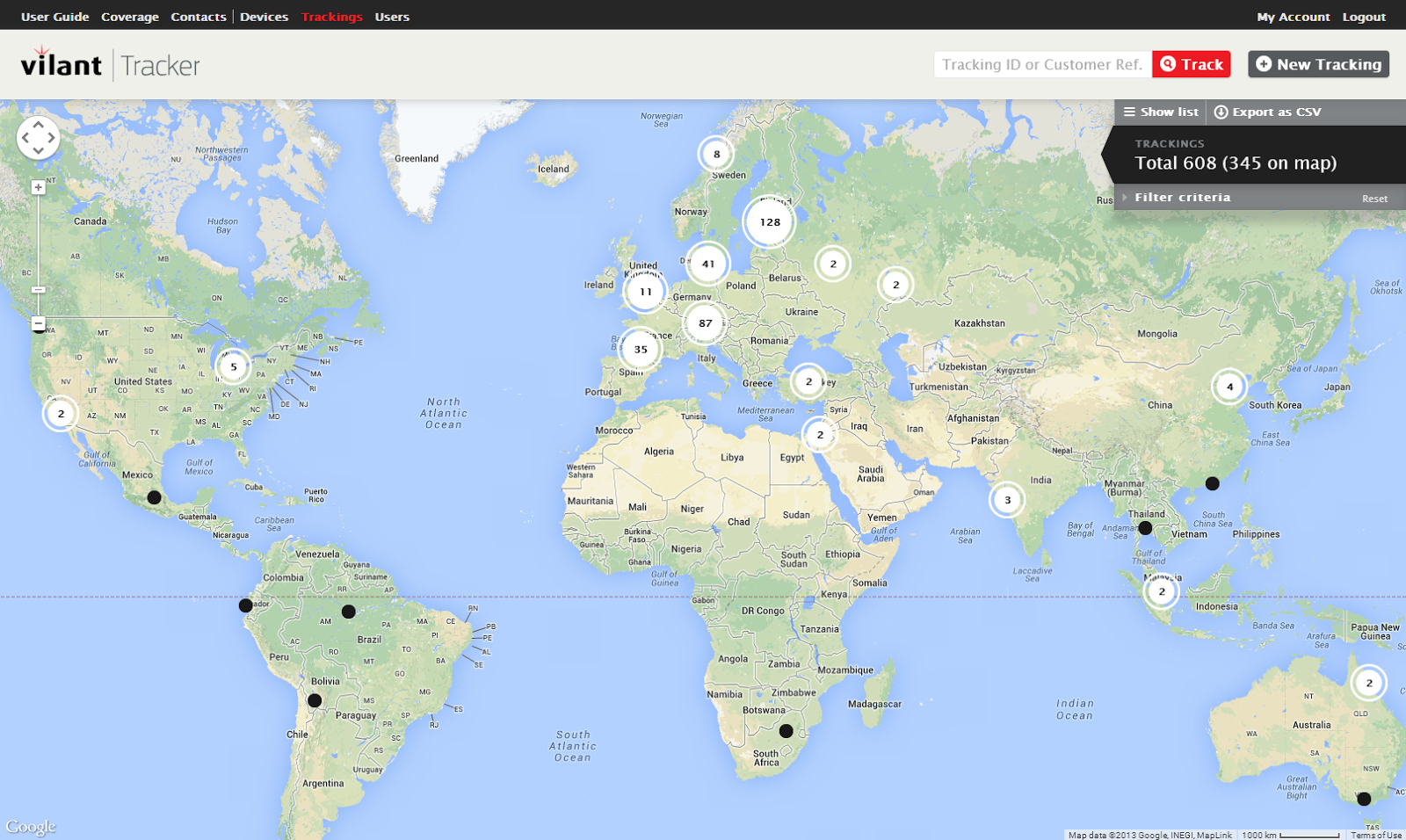
When my Vilant colleagues and I attended a trade show in Stockholm recently, we had to carry a bunch of posters, brochures, and giveaways on the plane, because an earlier shipment of duplicate material got lost in transit. To avoid this scenario in the future, we decided that from now on, we’d place a Vilant Tracker on all event packages, so that we could see their progress on a Google Map.

At Vilant, we’ve made it similarly easy for businesses to track the progress of shipments to their destinations using Google Maps and the Google Geolocation API, and for shipping companies to share this information with their own customers. Vilant technology makes shipping more efficient: Vilant’s Tracker devices use GSM (global system for mobile communications) technology, which means they are less expensive to operate and last longer than GPS devices. We also recently developed a unique Air Tracker for one of our customers, and it will be generally available in the future to help track progress of shipments by air.

To add even more efficiency to our Tracker systems, we looked at mapping solutions from several vendors, and we found that the Google Maps and Geolocation APIs were the easiest to customize for displaying the information we receive from our tracking devices. We considered some open-source products, but Google Maps’ image quality was much higher and the resulting maps were more reliable and faster to get online.
Vilant has developed a web-based tracker portal, built with Google Maps, where our customers can go to check on shipping status and create and share customized maps through unique URLs. Some customers also have large track-and-trace platforms, and we can easily integrate them with our trackers using the APIs.

The ability to generate and share maps helps businesses stay on top of shipments without time-consuming dialogue with shippers and warehouses. One of our customers, Tieturi, which provides business training and coaching, ships dozens of computers to training locations and needs to know that the computers will arrive before classes begin. The Google Maps API enables this by showing shipment locations practically in real time.
Another Vilant Tracker user, ABB, ships motors and generators and needs to tell customers when they will arrive. Instead of taking calls from customers and then calling trucking companies, ABB can simply email its customers a link to a Google Map showing the shipment’s location. It reduces administrative work, and sets ABB apart from the competition.

Like our customers, we see Google Maps as a big competitive advantage. The ability to visualize shipment locations and see delivery progress at a glance is sure to bring us new customers and help us win a larger share of the logistics market.
Read More
Posted in customer love, Google Maps for Business | No comments

Rio de Janeiro’s Center of Operations (COR) sets the stage for a smarter city with Google Maps

Posted on 07:00 by Unknown
Posted by Pedro Junqueira, Cheif Executive of the Center of Operations Rio de Janeiro (COR)

(Cross-posted on Google Brasil Blog)

Editor's note: Our guest blogger today is Pedro Junqueira, CEO and COO at the Center of Operations (COR) in Rio de Janeiro, Brazil. Established in 2010, COR monitors the daily activity of the city and potential crisis situations including traffic, major events and natural disasters. COR integrates the activities of 30 organizations. Today, 400 professionals work at COR in 3 shifts. See what other public institutions that have gone Google have to say.

Home to more than six million inhabitants, Rio de Janeiro is a vibrant city set in a tropical climate along the coast of Brazil. Rio is known for hosting large festivals and international events that attract hundreds of thousands of people, like the 2013 Confederations Cup, the recent Papal visit, and the beloved Carnaval. We’re currently planning for the 2014 World Cup and 2016 Olympic Games.

At the city’s Center of Operations (COR), it’s our job to keep the city running efficiently throughout the year, whether it’s during a major festival, when traffic is at peak levels, or during the summer rain, when flooding can create emergency situations. It’s no easy feat, but thanks to collaboration and teamwork, we’re able to get in front of potential crises and respond to emergencies when they do occur.

Technology plays a pivotal role in helping us do our job. We use Google Maps for Business to build and share geospatial data with partners that allows us to have a common operating picture and detect potential problems. We can act before they turn into real emergency situations. Each summer, for example, Rio is deluged by summer rains, leaving homes and streets flooded, inaccessible and damaged. With Google Maps for Business and a team that monitors meteorological conditions each day, we’re able to keep a close watch on flood-prone areas with dense populations. And when rain reaches a critical level, the team warns local officials to prepare for possible evacuation operations.

All the information needed to assess risks and take action is shared on one Google Map, enabling the various teams from the Municipal Guard, Civil Defense, Mayor’s office and others to easily coordinate and respond. We can even use Google Maps for Business to study preventative measures and minimize the impact of events that could affect the operational routine of the city. It’s all on a single map that combines data from a range of different agencies and sources.
Tracking the real-time state of the city and responding to emergencies immediately couldn’t be done without reliable technology like Google’s mapping solutions. Google Maps for Business integrates with our internal systems, and employees already rely on these tools in their personal lives, so using them for work comes naturally. Google helps COR make faster, better more informed decisions every day. It’s good for us, and it’s good for the people of Rio de Janeiro.

Read More
Posted in #gone google, customer love, Google Maps for Business | No comments

Monday, 18 November 2013

Google Maps for Business helps drive global growth for T Dispatch

Posted on 11:05 by Unknown
Posted by Mario Brandao, CTO of T Dispatch

Editor's note: Today's guest blogger is Mario Brandao, CTO of T Dispatch, a fast growing global provider of fleet management software. This post is part of our series on the Transport and Logistics Industry and the ways they’re relying on Google Maps for Business to get people, products and assets to their destinations faster.

If you’re like me, wherever you are in the world, you often depend on the knowledge of taxi and minicab drivers to get you where you want to be. And the firms that manage, equip and train these drivers are on a constant quest to improve the way their cars get around the many cities they travel around in. We started our company back in 2010 with the aim of creating an affordable mapping and dispatch technology that could be used by all sizes of fleet companies to become more efficient and more profitable.

Our clients tell us that drivers can spend around 30% of their time with the car empty; this is ‘dead’ mileage, which is costly and bad for the environment. We use Google Maps and an intelligent autodispatch algorithm to send jobs to the nearest driver, to find jobs within their catchment area and even to allocate jobs on their route home at the end of a shift. Controllers can create and dispatch a booking within 15 seconds, and we’re able to reduce time spent ‘empty’ by up to 50%.
We’ve found our clients love all the different features, too. The Google Tracks API makes it easy to pinpoint exactly where their drivers are at any one time, allowing jobs to be allocated more efficiently by dispatchers. And as this location data can be saved for up to ten years, clients can also use the technology to recognize trends and patterns and create more efficient processes in due course. Google’s snap-to-road tool even helps call centre dispatch managers to find out which side of the road the driver is on, which is especially helpful in some cities with complicated one way systems.

In the future we plan to integrate live weather reports, traffic information and use historical data to predict where busy areas will be, allowing fleets to anticipate where to send the drivers.

From a driver’s point of view, not only does the software help calculate the fastest route with the least mileage, but with Google Directions, drivers are able to calculate directions between locations before setting off, which prevents them from getting lost. Most importantly, most people are familiar with Google Maps and find it easy to use - which is important in a job when you’re often dealing with stressful circumstances like traffic and road closures.
Google Maps provides us with a comprehensive feature set too, so we’re able to offer our customers features like Directions as part of the package, which is a huge selling point for us. Furthermore, if we used some of the competition’s offering, every customer would have to pay a licensing fee but with Google this is avoided.

Google Maps has played a crucial role in helping us grow and move into new markets seamlessly - we’ve won clients across six continents, in over 30 different countries. I’m now looking forward to taking our technology with us to our next area of expansion - South America.

Read More
Posted in customer love, Google Maps, Google Maps API, Google Maps for Business, Google Maps Tracks API, T Dispatch | No comments

Saturday, 16 November 2013

Orbotix taps Google Apps to bring robots to life

Posted on 06:02 by Unknown
Editor's note: Colorado has enticed all sorts of pioneers since its Wild West beginnings. We’re excited to highlight a handful of these trailblazers - the intrepid entrepreneurs, aspiring micro-brewers and ambitious thought leaders - who have helped create the adventurous and innovative culture the Centennial State is known for. Today, we hear from Ian Bernstein and Adam Wilson, co-founders of Boulder-based Orbotix, a robotics toy company.

Can you tell us about Orbotix and how the company got started?
Orbotix is a new kind of robotics toy company: we’re creating a game platform that combines physical objects, smartphones and a software marketplace. We launched in 2010 with our first product, the Sphero ball, a robotic ball you can control with a tilt, touch or swing from your smartphone. You can drive the Sphero ball through a virtual obstacle course or let your dog chase it across your actual yard (under your control, of course) — it lets you both engage in the virtual world and play in the real one. We just released Sphero 2.0, and with a team of 35, we’re just getting started.

Why did you choose Google Apps? How are you using it day-to-day?
We use Google products like Gmail, Drive and Docs in our personal lives, so it was natural to use Google Apps for Business when we started Orbotix. We rely on Drive to securely store, centralize and share our executive documents — everything from legal forms to non-disclosure agreements. We use Docs to brainstorm, create and collaborate on new ideas, or to upload and store product specs that multiple people need to access on a regular basis. The fact that we can create and edit a single document at the same time has dramatically increased our efficiency and reduced the amount of time it takes to finalize a project. We’re a very collaborative team, and Google helps us keep a very team-oriented work environment. Docs is especially vital when we’re on the road, attending events or working remotely. The fact that we can pull up important docs on our mobile devices is crucial to keeping our business running 24/7.

How do you stay connected with your employees outside of the Boulder office?
Hangouts are integral to keeping the company connected, especially as we’ve expanded beyond Boulder — and into China. Our team there has the Hangouts app on their smartphones so they’re connected and available for a quick chat or for a virtual tour around a factory on the other side of the globe. It makes a world of difference to see each other face-to-face rather than just hear a bunch of voices on a conference call, and the experience is such an organic, seamless part of our daily routine. We saw it ourselves just a few weeks ago, when we were in China to check in with the team and do a global press tour: we found ourselves relying entirely on Hangouts to keep in touch with the Boulder office. Ian would be in one room on a Hangout with our CEO, I'd be in another room on a Hangout with our engineers. It was like we hadn't left Colorado.

Has Google Apps helped in your recruiting efforts?
We're always looking to add tech-savvy programmers and talent to our team, and the kinds of people we're looking for expect us to use cool and cutting edge-technology like Google Apps. I know that if I was looking to join a new company it would be a red flag if they were using anything different. We all use Google in our personal lives, so it’s natural that we want to extend that experience to our professional lives.

Do you use Google Apps to partner and collaborate with groups outside of your company?
Absolutely. We recently launched Sphero Rangers, which teaches kids of all ages how to program using Sphero robots. We go to local classrooms and host meetups in the Boulder area, but because we can’t travel to every city where there’s interest, we made a universal Rangers training deck using Google Presentations. That way, there’s a single master document we can share with our partners just by sending along a URL, and we know they always have the most up-to-date version. The Chicago Museum of Science and Industry, for example, have hosted a handful of programming classes for kids, thanks to our handy shared Google Presentation.
Read More
Posted in #gonegoogle, customer love | No comments
Older Posts Home
Subscribe to: Posts (Atom)

Popular Posts

  • Keeping you safe in 2013
    Posted by Eran Feigenbaum, Director of Security, Google Enterprise Most businesses these days rely on technology to get their work done. An...
  • GeoEye Using Google Earth Builder for Commercial Distribution of their Data
    Posted by Dylan Lorimer, Google Earth and Maps for Business Product Manager Since 2008, Google has worked with GeoEye to publish millions ...
  • Mapping a clear strategy for business growth with Google
    Posted by A.V. Dharmakrishnan, Chief Executive Officer, Madras Cements Editor's note: Today’s guest is A.V. Dharmakrishnan, Chief Exec...
  • Third-party apps: now easier to find and more secure
    Posted by Apoorv Saxena, Product Manager, Google Apps for Business There are thousands of third-party applications that integrate with Goog...
  • FedEx.com re-imagined with Google Maps Engine
    Posted by Pat Doyle, Manager IT, FedEx Editor's note: Today we announced the availability of the Google Maps Engine API , letting organ...
  • Artwork powered by Chromebooks at the Polaroid Fotobar
    Posted by George Garcia, CIO, TWS Partnership Editor's note: Today’s guest blogger is TWS Partnership’s Chief Information Officer, Geo...
  • Playworks Transforms more than Recess with Chromebooks and Apps
    Posted by Richard Ng, IT director, Playworks Editors note: Today’s guest blogger is Richard Ng, IT director at Playworks, a nonprofit organ...
  • Graduation Alliance deploys Chromebooks to help at-risk students earn diplomas
    Posted by Gregg Rosann, President, Co-Founder and Chief Technology Officer, Graduation Alliance Editor's note: Today’s guest blogger is...
  • GHouse has gone Google
    Posted Tim Luckow, Founder & Owner of GHouse Editor's note: From the founding of Faneuil Hall in 1740 to the opening of Franklin So...
  • Google Apps for Education helps Pt England School raise achievement levels
    Posted by Dorothy Burt, professional development leader at Pt England School Editors note: Today’s guest blogger is Dorothy Burt, a profess...

Categories

  • #gone google
  • #gonegoogle
  • #Google Apps
  • #innovationupgrade
  • #moregoogleapps
  • #SysAdminDay
  • #tbt
  • #throwbackthursday
  • #top10trust
  • 100% web
  • admin
  • admin sdk
  • Android
  • Apps
  • Apps Adventures
  • Asia Pacific
  • Audi
  • Audi Connect
  • Australia
  • big data
  • Big Query
  • bigquery
  • Boston
  • browser
  • Chrome
  • Chrome for Business
  • Chrome Frame
  • Chrome OS
  • chromebooks
  • Chromebooks for Education
  • chromebox
  • City 24/7
  • Clearing Kosovo
  • Cloud
  • cloud computing
  • cloud computing gonegoogle
  • cloud computing gonegoogle Google Apps
  • cloud computing gonegoogle Google Apps google docs small business success story
  • cloud computing gonegoogle Google Apps google docs small business success story switch
  • cloud datastore
  • cloud platform
  • cloud print
  • cloud services
  • cloud sql
  • collaboration
  • Colorado
  • contacts
  • customer love
  • Customer story
  • Customer testimonial
  • Developer
  • developers
  • Docs
  • documents
  • drive storage
  • Earth
  • earth and maps
  • education
  • enterprise
  • events
  • FedEx
  • Fedex.com
  • franchises
  • Gartner
  • GE
  • Global Partner Summit
  • gmail
  • Gone Google
  • gonegoogle
  • Google App Engine
  • Google Apps
  • Google Apps Blog
  • Google Apps Engine
  • Google Apps for Business
  • google apps for education
  • Google Apps for Government
  • Google Apps Reseller
  • Google Apps Script
  • Google Apps Vault
  • Google Calendar
  • Google Cloud Platform
  • google cloud storage
  • google commerce search
  • Google Compute Engine
  • google docs
  • google drive
  • Google Earth
  • Google Earth Enterprise
  • Google Earth Pro
  • Google Enterprise
  • Google Enterprise Search
  • Google Forms
  • Google Green
  • google groups
  • Google Maps
  • Google Maps API
  • Google Maps Coordinate
  • Google Maps Engine
  • Google Maps Engine public data program
  • Google Maps for Business
  • Google Maps Tracks API
  • Google Places API
  • google play for education
  • Google Prediction API
  • Google Search Appliance
  • google sites
  • Google spreadsheets
  • google storage
  • Google Storage for Developers
  • google+
  • Google+ api
  • Google+ Communities
  • googlenew
  • government
  • GSA
  • GSA 7.0
  • guest post
  • HALO Trust
  • Hangout on Air
  • hangouts
  • innovation
  • international trade
  • Internet Explorer
  • intranet
  • iOS
  • iPad
  • IT
  • K-12
  • large business
  • manufacturing
  • Maps
  • marketplace
  • medium business
  • mobile
  • moms
  • Mother's Day
  • NAVMAN
  • new features
  • Niagara International Transportation Technology Coalition
  • non-profit
  • noteworthy
  • offline
  • partner
  • partners
  • Place Summaries
  • Postini
  • productivity
  • Quickoffice
  • Receptionist's Day
  • retail
  • SBW2013
  • Search
  • Security
  • Sheets
  • Slides
  • small business
  • SMB
  • success story
  • support
  • System Admin
  • T Dispatch
  • Transport and Logistics
  • Trust
  • university
  • utilities
  • Veteran Owned Businesses
  • Veterans Day
  • wallet
  • webinar

Blog Archive

  • ▼  2013 (239)
    • ▼  December (18)
      • Keeping you safe in 2013
      • Google+ Helps Premier Foods Elves Get Ready for th...
      • Kurdistan Regional Government is first government ...
      • Google Chromebooks provide personalization, collab...
      • [Automatic response] A Reply from Google Groups
      • Images Now Showing
      • New Google Sheets: faster, more powerful, and work...
      • More Chromebook options for your schools from Dell
      • Graduation Alliance deploys Chromebooks to help at...
      • WaterTrax gives utilities a visual view of water q...
      • Google Apps helps eco-cosmetics company LUSH keep ...
      • Fairfax NZ gets on the same page with Google Apps
      • National Geographic shares rich map content with t...
      • Google Compute Engine and App Engine give Evite fr...
      • Google Apps Improves Efficiency for Redfin Agents ...
      • Pediatric Home Service puts patient care at nurses...
      • Google Compute Engine is now Generally Available w...
      • The State of Colorado Puts Innovation First
    • ►  November (25)
    • ►  October (29)
    • ►  September (19)
    • ►  August (11)
    • ►  July (21)
    • ►  June (26)
    • ►  May (24)
    • ►  April (20)
    • ►  March (13)
    • ►  February (17)
    • ►  January (16)
  • ►  2012 (176)
    • ►  December (18)
    • ►  November (17)
    • ►  October (21)
    • ►  September (15)
    • ►  August (13)
    • ►  July (11)
    • ►  June (19)
    • ►  May (16)
    • ►  April (13)
    • ►  March (9)
    • ►  February (12)
    • ►  January (12)
  • ►  2011 (85)
    • ►  December (14)
    • ►  November (19)
    • ►  October (17)
    • ►  September (21)
    • ►  August (14)
Powered by Blogger.

About Me

Unknown
View my complete profile